How the BodyRecomp App Works: Step-by-Step Guide
How the BodyRecomp App Works: Step-by-Step Guide
The BodyRecomp app is designed to be simple to use while delivering results based on evidence-based body recomposition principles. This guide walks you through exactly how the app works, from your first setup to daily use, so you know what to expect before you download.
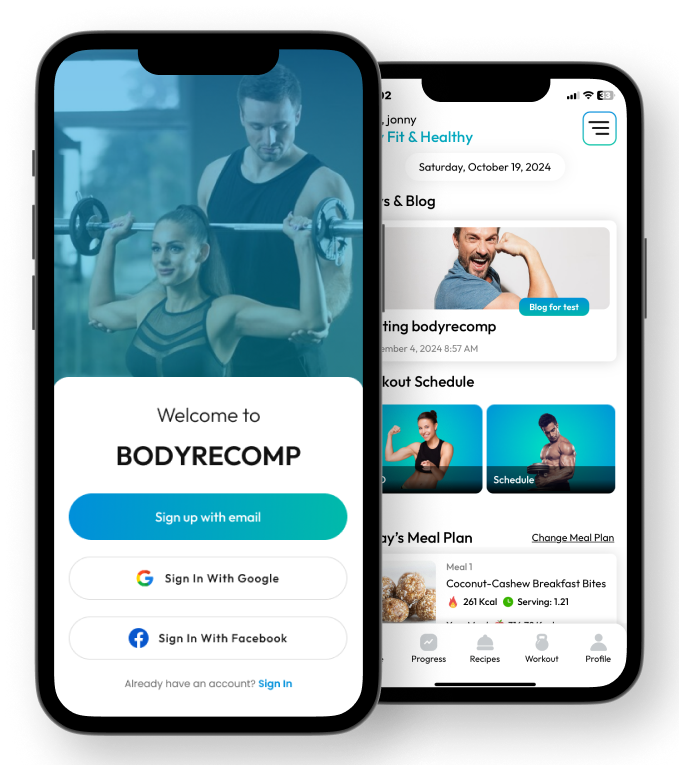
Step 1: Download and Create Your Account
The BodyRecomp app is available free on:
- App Store (iOS): Download for iPhone
- Google Play (Android): Download for Android
Download the app and create a free account using your email address. No credit card required to get started.
Step 2: Complete Your Personalized Setup
The onboarding questionnaire takes approximately 3–5 minutes and collects the information needed to build your personalized plan:
Body Stats
- Current weight and height
- Age and gender
- Estimated current body fat percentage (visual chart provided for reference)
Fitness Level
Choose your honest starting point:
- Beginner: Less than 6 months of consistent resistance training
- Intermediate: 6 months – 2 years of consistent training
- Advanced: 2+ years of consistent, structured training
Your Primary Goal
- Lose Fat (priority on fat loss with muscle maintenance)
- Build Muscle (priority on muscle gain with fat control)
- Body Recomposition (equal priority on both — the most popular selection)
Training Preferences
- Days per week available (3, 4, or 5)
- Equipment access (Full gym, Home gym with equipment, or Bodyweight only)
- Any injury restrictions or exercise limitations
Dietary Preference
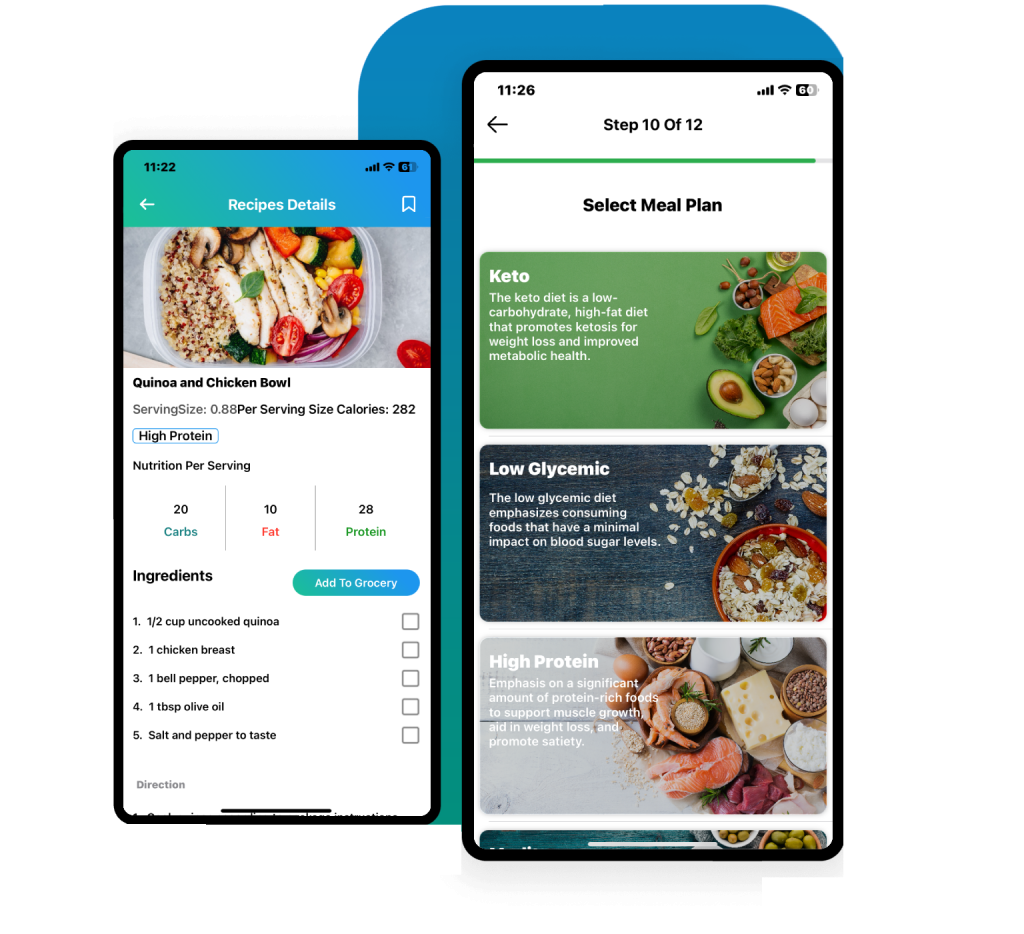
Select your preferred eating style:
- High Protein
- Keto (very low carb)
- Paleo (whole foods, no grains or dairy)
- Mediterranean (heart-healthy fats + whole grains)
- Vegan (100% plant-based)
- Low Glycemic (blood sugar-focused)
Step 3: Receive Your Personalized Plan
Within seconds of completing setup, the app generates:
Your Calorie and Macro Targets
Based on your TDEE (calculated from your body stats and activity level), the app sets:
- Daily calorie target (with appropriate deficit for fat loss and recomposition)
- Protein target (in grams)
- Carbohydrate target (in grams)
- Fat target (in grams)
These are automatically adjusted based on whether it's a training day or rest day.
Your Workout Program
A complete weekly workout schedule matched to your:
- Fitness level (beginner through advanced exercise selection)
- Schedule (number of days chosen)
- Equipment availability
- Primary goal (fat loss, muscle building, or recomposition-focused)
Each workout lists:
- Exercise name with demonstration image or video
- Sets, reps, and rest periods
- Weight guidance or progression suggestions
Your Daily Meal Plan
A full day-by-day meal plan based on your dietary preference and calorie/macro targets. Each meal includes:
- Recipe instructions
- Ingredient list with quantities
- Macro and calorie breakdown per meal
- Total daily nutritional summary
Step 4: Your Daily Routine With the App
Morning
Open the app to see today's meal plan. Review what you'll be eating and note any prep needed.
Before Your Workout
Open the workout section to see today's training session. Review exercises and weights from your last session to know what to aim for.
During Your Workout
Log each set as you complete it. The app records weight, reps, and performance. Over time, it shows your strength progression and suggests when to increase weight.
After Your Workout
Log your meals as you eat them (or at the end of the day) to see your daily macro and calorie totals vs. targets.
Weekly Check-In
Once per week, update your body measurements and weight. The app tracks trends over time and shows your recomposition progress in graphs.
Step 5: Progression and Adaptation
The app isn't a static plan — it adapts:
Automatic calorie adjustment: As your weight changes, your TDEE changes. The app recalculates your targets periodically to prevent plateaus.
Workout progression: The app tracks your performance and suggests weight or rep increases when you consistently hit your targets.
Program phase changes: At 4–6 week milestones, the app introduces program variations to prevent adaptation and maintain progress.
Key Features at a Glance
| Feature | Details | |---|---| | TDEE Calculator | Automatic, updated as weight changes | | Workout Programs | 6 programs, 150+ exercises | | Meal Plans | 6 dietary styles | | Macro Tracking | Daily target vs. actual | | Progress Tracking | Weight, measurements, photos, strength | | Equipment Flexibility | Full gym, home, or bodyweight |
Who Gets the Best Results With BodyRecomp?
Users who see the best results are those who:
- Follow the meal plan at least 80% of days
- Complete workouts 3–4x per week consistently
- Log their progress weekly
- Use the app for 8–12 weeks minimum before evaluating results
Body recomposition takes time. The app provides the structure; consistency delivers the results.
For an independent assessment, read our BodyRecomp app review or compare it with other fitness apps for body recomposition. Visit our training page to explore the workout categories available.
Ready to start your body recomposition journey? Download BodyRecomp — the app that gives you personalized workouts and meal plans built around your exact goals.
Start Your Transformation Today
Get a personalized workout program and meal plan built around your exact goals. Free to download — no credit card required.